EN


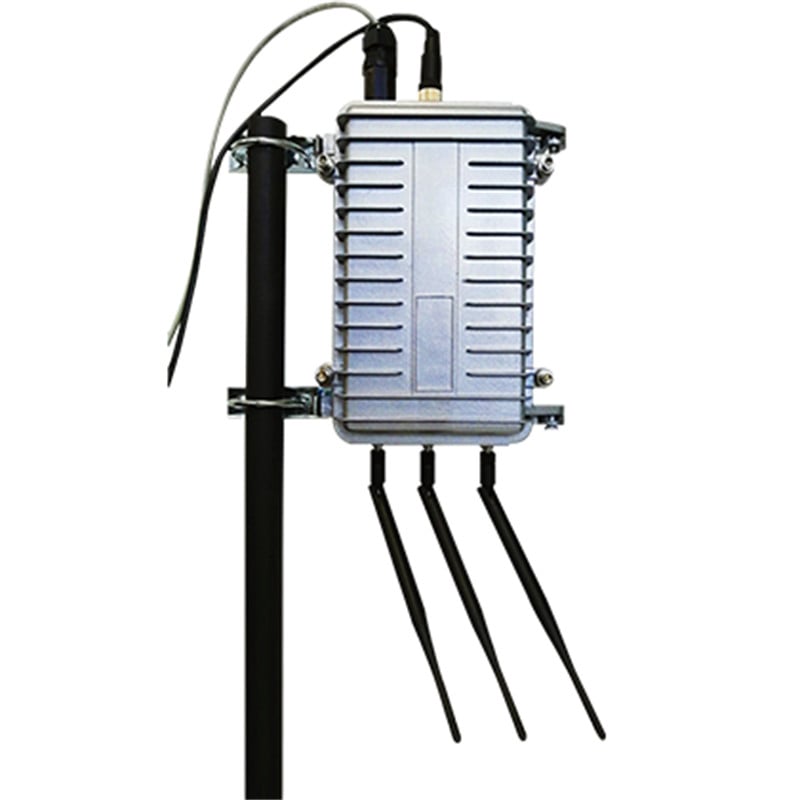
FU-OD-04 UWB Proximity Warning Base Station
Thank you for choosing our company's UWB proximity warning base station. The UWB proximity warning base station can achieve precise distance measurement and alarm. The product is designed, produced and manufactured in accordance with industrial standard requirements, and is waterproof, lightning protection and explosion-proof. It meets the standard application requirements of industries such as coal mines, chemical engineering, construction tunnels, construction sites, power, steel mills and schools. Please read this instruction carefully before operation.
- Overview
- Technical Parameters
- Installation Instructions
- Recommended Products
Overview
Product Functions
| Function | Description |
| Real-time accurate ranging | High-precision real-time ranging indoors and outdoors to achieve proximity alarms. |
| One-key alarm | The tag features a one-key alarm function (long press to trigger the alarm). |
| Electronic fence management | Multi-type area rules (safe, warning, danger), multiple trigger modes (enter, leave, enter and leave), and multiple alarm methods (background push, audio prompts). |
| Location service API | Personnel location coordinates, sensor information (battery level, etc.), personnel information, etc. |
Proximity Warning Instructions:
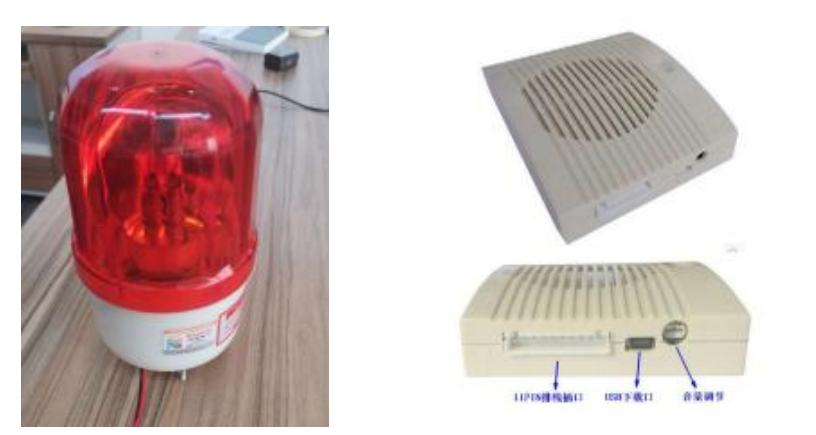
After the proximity warning base station is powered on, it requires a self-test of 30 seconds to 1 minute to start up. Once the device starts up normally, when the positioning tag enters the alarm area set by the base station (the default alarm distance is 10 meters and can be changed according to on-site requirements), the positioning tag will emit a "beep beep beep" alarm sound (it can be set to alarm continuously or only alarm three times). If an alarm is also needed at the base station side, an external voice alarm (which requires advance customization, type image shown below) can be connected to the base station. The content of the voice alarm can be changed according to customer requirements.
If the tag does not enter sleep mode and remains within the alarm area set by the base station, the voice alarm and the positioning tag will continue to alarm. If the tag enters sleep mode or leaves the alarm area set by the base station, the voice alarm will stop alarming.
Technical Parameters
| Power Parameters | |||
| Name | Parameter | Description | Remarks |
| Power Supply Method | DC | DC12V2A | |
| Power Interface | External Power | 12V2A Supply | |
| Operating Environment | |||
| Name | Parameter | Description | Remarks |
| Operating Temperature (℃) | -30~70℃ | ||
| Storage Temperature (℃) | -40~85℃ | ||
| Humidity | 10% to 90%RH non-condensing | ||
| Protection Level | IP66 | ||
| Base Station Dimensions (mm) | 237*195*78 | ||
| Weight (kg) | 1.2 | ||
| Positioning | |||
| Name | Parameter | Description | Remarks |
| Positioning Mode | TOF/TDOA | TOF: 0D TDOA: 1D, 2D | |
| Positioning Type | 0D, 1D, 2D | ||
| Positioning Frequency Band | channel 2 | 3.7~4.2GHz | Center frequency 3.95Ghz |
| Positioning Accuracy | 10~30cm | ||
| Ranging Distance | 400m | If the ranging distance is greater than 400 meters, the rod UWB antenna needs to be replaced with a directional antenna, and the maximum ranging distance is recommended not to exceed 800 meters | Open and unobstructed |
| Alarm Method | 75dB (sound, light and voice) | The alarm method at the base station can be sound and light alarm or voice alarm | The voice alarm content can be customized according to customer requirements |
| Antenna RF Parameters | |||
| Name | Parameter | Description | Remarks |
| Antenna | UWB, 4G, 2.4G | External rod antenna | |
| UWB | Frequency band 3700~4200Mhz | 3dB Gain | |
| 4G | 4G Full Netcom • LTE-TDD Quad-band Band 38/39/40/41 • LTE-FDD Quad-band Band 1/3/5/8 |
5dB Gain | (Supports 4G data cards or voice cards from major carriers) |
| 2.4G | Frequency band 2400~2500Mhz | 3dB Gain | |
| RF Parameters | |||
| Name | Parameter | Description | Remarks |
| WIFI | +20dB Transmit Power | Transmission distance: 50m | |
| Bluetooth | 0dB Transmit Power | Transmission distance 20m | |
| 4G | Transmit Power: +23dB | ||
| Lightning Protection | |||
| Name | Parameter | Description | Remarks |
| Clamping Voltage | 56V | ||
| Varistor Voltage | 68 (61~75) V | ||
| Surge Current | 1KA | ||
| Static Electricity | |||
| Name | Parameter | Description | Remarks |
| Breakdown Voltage | 6V | ||
| Reverse Stand-off Voltage | 5V | ||
| Electrostatic Discharge Voltage | ±15kv | ||
Packaging
Proximity warning base station packing list
| Name | Quantity | Unit |
| Proximity Warning Base Station | 1 | Unit |
| Power Adapter | 1 | Set |
| UWB Antenna | 1 | Piece |
| 4G Antenna | 1 | Piece |
| WIFI Antenna | 1 | Piece |
| L-shaped Allen Wrench | 1 | Piece |
| L-shaped Bracket | 2 | Piece |
| U-shaped Clamp | 2 | Piece |
| User Manual | 1 | Copy |
| Certificate of Conformity | 1 | Copy |
| Warranty Card | 1 | Copy |
Installation Instructions
1. Base Station Assembly: Choose one network connection method based on your environment: Ethernet, Wi-Fi, or 4G.
A. Using a 4G Card
a. Remove the four hex screws on the front of the base station.
b. Open the cover and insert the 4G card into the card slot.
c. Close the cover and tighten the screws diagonally using an Allen wrench.
d. Connect the UWB and 4G antennas.
e. Power on, and the base station will work normally online.
B. Using Ethernet
Power on, and the base station will work normally.
C. Using Wi-Fi
a. Change your Wi-Fi account and password to match the base station's configured Wi-Fi account and password. Connect to the Wi-Fi within the signal coverage area. Power on, and the base station will work normally.
b. Change the base station's Wi-Fi account and password to the customer-specified account and password. Connect to the Wi-Fi within the signal coverage area, and after powering on, the base station can work normally.
2. Base Station Installation
1. Use screws to fix the L-shaped bracket to the side buckle of the base station.
2. Use a U-shaped clamp and L-bracket to secure the base station to the mounting pole.
3. Install the UWB antenna, 4G antenna, and 2.4G antenna in their corresponding positions.
4. Fix the base station to the installation point.
5. Power on, and ensure there is no obstruction between the proximity warning base station's UWB antenna and the positioning tag.
Precautions
Keep away from fire sources and strong electromagnetic interference sources.